
WhatsApp username reservation opened globally on 29 June 2026. A WhatsApp username replaces your phone number for new contacts and lets people message you without ever seeing your digits. Reservation takes less than a minute through Settings, Account, Username. Full username based messaging rolls out gradually over the coming months, country by country.
What Is a WhatsApp Username?
A WhatsApp username is a unique handle, between 3 and 35 characters, that stands in for your phone number when you connect with someone for the first time. For example, a user named Deepa can reserve the handle @DeepaSupreme and share that instead of her mobile number. Anyone who already has her number, shares a group with her, or has messaged her before still sees her number as usual.
WhatsApp built this feature because phone numbers carry personal weight. A phone number ties to bank accounts, family contacts, and years of history. A username removes that weight from a first conversation with a stranger, a new business contact, or someone met at an event.

How to Reserve a WhatsApp Username
Reserving a username follows five steps inside the WhatsApp app. Each step takes a few seconds.
Step 1: Update WhatsApp and Open Account Settings
Update WhatsApp to the latest version from the Play Store or App Store. Open the app, tap Settings, then tap Account. The Account screen lists Username under the “Your account” section, alongside Change Phone Number and Request Account Info.
Step 2: Tap Username and Choose Create Username
Tap Username to open the Reserve Username screen. This screen explains that the username keeps the phone number private from people who do not already know it. Tap Create Username to type a custom handle.

Step 3: Use an Instagram or Facebook Username Instead (Optional)
A user can skip typing a new name and tap Use Instagram Username or Use Facebook Username instead. This option only works when the WhatsApp account sits inside the same Meta Accounts Center as the Instagram or Facebook account. Creators and businesses gain consistent branding across all three apps through this single tap.
Step 4: Set Up a Username Key
WhatsApp generates an optional 4 digit Username Key on the next screen, for example 7131. The key adds a second checkpoint, since a first time contact must enter this key alongside the username before WhatsApp allows the message. A user can tap Get a Different Key to generate a new code or tap Save Key to lock in the current one.

Step 5: Confirm Your Username Reservation
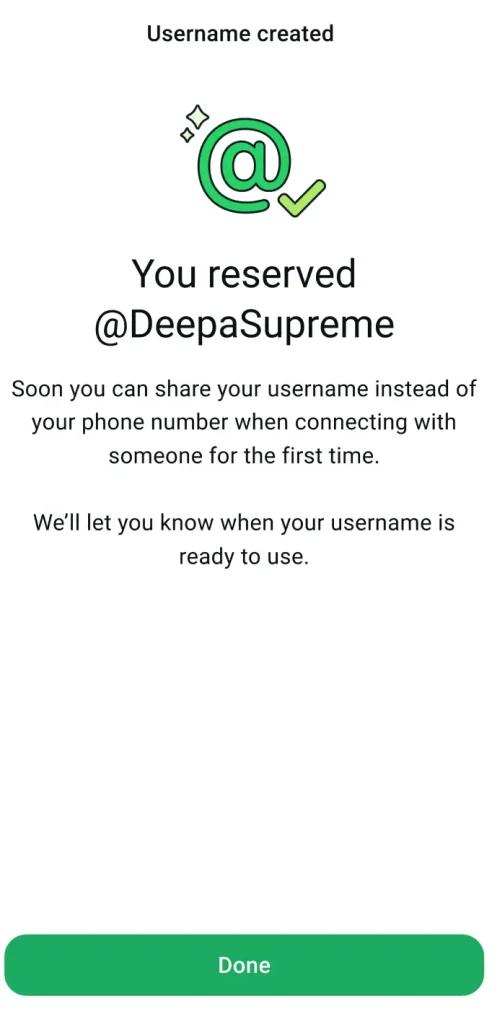
A confirmation screen appears once the username and key are set, showing text such as “You reserved @DeepaSupreme.” WhatsApp holds this name exclusively for the account holder and sends a notification once the username becomes active for messaging in that user’s country.
Which Rules Apply to a WhatsApp Username?
A WhatsApp username must follow four fixed rules. The username needs 3 to 35 characters. The username needs at least one letter. The username cannot consist entirely of numbers. The username must be unique across the entire WhatsApp user base of more than three billion accounts.
WhatsApp offers a built in username generator when a chosen name is already taken. The generator suggests close alternatives based on the original text typed. WhatsApp has also pre reserved usernames that match celebrities, politicians, and well known organisations, so a name matching a public figure shows as unavailable even on the first day of reservations.
What Is the WhatsApp Username Key?
The Username Key is an optional 4 digit code that a first time contact must enter, alongside the username, before they can send their first message. A user shares the key the same way they share the username, for example by saying “Message me at @YourName, my key is 1427.”
The Username Key exempts three groups automatically. Existing contacts who already have the phone number saved skip the key requirement. Members of a shared group chat skip the key requirement. Anyone who has exchanged messages with the user before skips the key requirement. The key only applies to brand new contacts reaching out through the username for the first time.
How Does WhatsApp Username Compare to Telegram and Signal?
WhatsApp username differs from Telegram username through its directory policy and from Signal username through its permanence. WhatsApp blocks public search entirely, while Telegram allows global search across users, groups, and channels by exact username. Signal username works only as a one time connector, since the visible profile name takes over once a chat begins, while WhatsApp and Telegram usernames stay visible as a permanent handle.
| Feature | Telegram | Signal | |
|---|---|---|---|
| Public directory | No | Yes, global search | No |
| Spam barrier beyond report/block | Optional 4 digit Username Key | None | Username is not a stable handle |
| Cross platform claim | Claims existing Instagram or Facebook username | Not available | Not available |
| Username permanence | Permanent until changed | Permanent until changed | Changes any time, old one stops working instantly |
Telegram username suits creators who want discovery through search. Signal username suits a one off exchange, such as a single tip line for a journalist. WhatsApp username suits everyday contacts who want privacy from strangers while keeping the existing identity stable across Instagram, Facebook, and WhatsApp.
Why Are WhatsApp Usernames Not Fully Active Yet?
WhatsApp opened reservations on 29 June 2026 ahead of the feature’s actual messaging functionality. Username based messaging activates gradually over the coming months, country by country, after a user receives an in app notification. A reserved username during this window locks in the name but does not yet allow a stranger to message that user through it.
Two further limits apply during this rollout window. WhatsApp’s own documentation confirms that username transfer across different devices is not currently available. A business relying on a username also cannot rely on search discovery, since the absence of a public directory means sharing a direct wa.me link or QR code remains the only outreach method.
Frequently Asked Questions
Is reserving a WhatsApp username free?
Yes. Reserving a WhatsApp username costs nothing and takes place entirely inside the existing WhatsApp app through Settings, Account, Username.
Can I change my WhatsApp username later?
Yes. WhatsApp allows a username change at any time, provided the new name passes the same 3 to 35 character and uniqueness rules as the first reservation.
Will people see my phone number if I have a username?
No. People who message a user for the first time through their username see the username instead of the phone number. Existing contacts and group members continue to see the phone number as before.
What happens if my username is already taken?
WhatsApp displays the built in username generator with alternative suggestions based on the original text entered, since each username must stay unique across more than three billion accounts.
Does my username work for messaging right away?
No. A reserved username locks in the name immediately, but actual username based messaging activates gradually by country over the coming months, with an in app notification confirming activation.
WhatsApp username reservations apply worldwide as of 29 June 2026. Check Settings, Account, Username inside the app to see whether the feature has reached your account, and keep WhatsApp updated to the latest version to avoid missing the activation notification.
