
Hello guys, are you getting tired of long queues and paperwork just to get a new prepaid SIM card? It doesn’t sound good, right? In today’s digital era, buying a new SIM card online is quick, easy, and completely hassle-free. With BSNL, you can now skip the long waits and directly buy a BSNL SIM card online from the comfort of your home.

As a trusted name in the Indian telecom industry, BSNL provides reliable, affordable, and convenient services, including the option to order your new prepaid BSNL SIM online and get it delivered to your doorstep.
However, you are wondering how to buy BSNL SIM online or exploring ways to buy BSNL SIM card online free, this blog will guide you step-by-step, from eligibility to activation.
Also know how to Port BSNL to Jio Online in 4 Simple Steps (Benefits Included)
How Do You Book a BSNL SIM Online from Home?
Yes, you can book a BSNL SIM from home using the official SKYC Sahaj portal. Open sahaj.bsnl.co.in/skyc/ on your phone, enter your PIN code, complete Aadhaar verification, capture your photo and video, and submit.
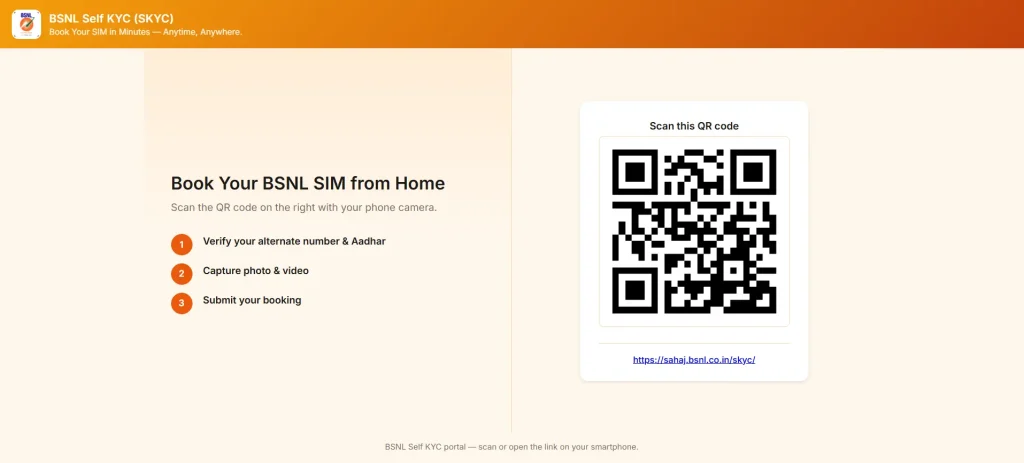
The booking runs in 4 steps. Complete each step in order. Do not close the portal between steps as the session resets.
Step 1: Check Pincode Availability and Open the Portal
Open sahaj.bsnl.co.in/skyc/ on your smartphone browser. You can also scan the QR code from the BSNL Sahaj landing page using your phone camera. The booking form opens directly.
The first screen asks for your PIN code. Enter your 6-digit area PIN code. The system checks whether a BSNL delivery partner operates in your area. The delivery is available, so the form moves to the next step. The delivery is not available, so the system shows a CSC collection option instead. The CSC option is explained in the home delivery section below.
Step 2: Verify Your Aadhaar and Alternate Number
Enter your name, your 12-digit Aadhaar number, and your alternate active mobile number. BSNL sends an OTP to that alternate number for verification.
Enter the OTP on the portal screen. The OTP confirmation completes your identity verification for this step. The system uses Aadhaar-based e-KYC to validate your details automatically. No physical Aadhaar copy is needed at this step.
Select who the SIM is for: yourself, a family member, or someone else. Booking for another person requires that person’s Aadhaar number and their alternate mobile number.
Step 3: Capture Live Photo and Video
Allow the portal to access your smartphone camera when the browser asks. This step uses your front-facing camera.
Take a live selfie photo and record a short video as directed on the screen. The live capture confirms that the person completing the KYC is physically present. This replaces the biometric fingerprint verification that used to happen at a BSNL store.
Keep these 3 things ready for this step:
- Good lighting on your face (face a window or a direct light source)
- A stable hand or a flat surface to rest your phone
- Camera permission enabled in your browser settings before starting
The camera does not open when your browser blocks camera access. Check browser permissions in your phone settings and retry.
Step 4: Select Your Plan and Submit Booking
The portal shows available prepaid and postpaid plans for your telecom circle after the photo and video step. Select the plan that fits your usage.
Review your details on the confirmation screen. Check your name, address, and selected plan one more time. Tap Submit.
BSNL sends a confirmation SMS and a booking reference number to your alternate mobile number. Save this reference number for SIM delivery tracking.
Buy a BSNL SIM Online Via Third Party Website
1. Visit a third website, like 10digit.com or another website you choose.
2. Then select a connection, whether you want a prepaid or postpaid connection.
3. Choose a specific BSNL plan that suits your needs.
4. Enter your details like your name, email, mobile number, address, and other information required for the KYC process.
5. Once you provide all your details, confirm your order and place it.
6. At last, wait for the BSNL agent to visit your location at your chosen time to complete the doorstep KYC and activate your SIM card.
BSNL SIM Card Price List
| SIM Type | SIM Price (₹) | Service Tax (₹) | Total MRP (₹) | Validity (Days) |
| 5G SIM | 99 | 12 | 111 | 30 |
| 4G SIM | 50 | 6.5 | 56.5 | 10 |
| 256K SIM | 99 | 12 | 111 | 30 |
| 128K SIM | 49 | 6 | 55 | 15 |
| 32K/64K SIM | 17.8 | 2.2 | 20 | 7 |
How to Activate Your New BSNL SIM?
Once you receive your BSNL 5G SIM card, before using its benefits and services, you are required to activate it, but you don’t know how. Follow the steps below to do so.
Insert the SIM: Insert the new BSNL SIM card into your smartphone.
Wait for the network: Once you insert the SIM card into your device, wait for the network.
Follow on-screen Instructions: Your phone might ask for some information or verification.
After doing all the processes, you successfully activated your BSNL prepaid SIM.
Benefits of Buying a BSNL SIM Card Online
There are several benefits of buying a SIM card online, as mentioned below:
- Convenience: It eliminates the need to stand in long queues at BSNL offices by placing your order right from home or work.
- Time-Saving: From choosing a plan to receiving your SIM, the process is quicker than traditional methods.
- Easy Comparison: Browse and evaluate multiple plans at your own pace, selecting the one that fits you best.
- Secure Payment: Enjoy a safe and reliable payment option that keeps your financial details protected.
- Doorstep Delivery: Get your SIM card delivered directly to your home, avoiding the need to visit a store.
Types of BSNL SIM Cards
BSNL provides traditional physical SIM cards and e-SIMs. These SIM cards come with varying storage capacities (32K/64K, 28K, 256K), and support 4G and 5G networks. Let’s check the details below.
| SIM Type | Key Features |
| 5G SIM | High-speed 5G data (plan-dependent) |
| 4G SIM | 4G LTE support |
| 256K SIM | Faster browsing (256kbps) |
| 128K SIM | Unlimited 128kbps data after pack expiry |
| 32K/64K SIM | Basic 2G/3G support |
Common Issues While Buying a BSNL SIM Card Online
BSNL SIM Order Online Related Issue
When ordering a BSNL SIM online, you may face common issues like:
- Always double-check your personal and contact details to avoid errors.
- In case of payment failures, ensure sufficient funds are available or try another payment method.
- If your order confirmation email does not appear in your inbox, check the junk or spam folder. If it is still missing, contact BSNL customer care for assistance.
BSNL SIM Delivery Issue
- If you face a delivery delay, reach out to the courier service or BSNL customer support for the latest status.
- Incorrect address: Ensure you provide the correct address at the time of ordering.
- Remember to inspect the SIM card for any physical damage, if found damaged, request a replacement from BSNL.
BSNL SIM Activation Issue
If you face no network coverage, first check whether your phone is compatible with BSNL’s network and ensure the SIM card is inserted properly. In case of activation failure, you should contact BSNL customer care for support. If the issue is due to incorrect SIM details, verify the number and validity with BSNL.
Conclusion
Buying a BSNL 5G prepaid SIM card online is now simpler than ever. You can now order a new prepaid SIM card, choose the perfect plan, and get it delivered to your doorstep within just few clicks. By following all the steps below & reading the complete guide carefully, you will easily purchase a new BSNL SIM online for free.
