
Reliance Jio Launches JioPC, a cloud computing device with maintenance-free virtual desktop service, that can transforms any screen into a high-performance computer. The services can be flexible, as much you pay more fun you have. It targets students, small businesses, and professional. Through JioPC users get access to AI tools and cloud storage, and can experience a window-like desktop. Let’s dive deep to know more on it.

JioPC App: Reliance Jio introduced JioPC, a cloud computing device or virtual desktop with maintenance-free that promises to transform any screen into a high-performance computer with AI features and tools without requiring expensive hardware.
JioPC is an AI-ready platform that can be launched with a flexible recharge model, pay-as-you-go pricing starting at Rs 400 per month, that aims to target students, small businesses, and professionals across India.
JioPC services promise to deliver a worth Rs 5000 PC through its cloud technology, offering instant boot-up, automatic updates, and network-level security protection from viruses and malware. It can be available to both Jio Airfiber and JioFiber customers across the country.
Additionally, JioPC includes partnerships with Adobe, providing free access to Adobe Express, along with AI tools and some popular applications, and 512GB of cloud storage. Guys, read this blog to continue about its prices, benefits, plans, and how to set it up.
What Is JioPC ?

JioPC is a cloud computing or a virtual desktop service that can transform any screen into a computer. It is enhanced with AI features that do not require connecting with any external hardware device. It provides its users an access to a full window-like desktop experience through their existing Jio Set-top-box, or requires only a mouse, keyboard, and a display screen.
It’s a cloud-based system that ensures users can always get access to the latest technology trends without any hardware depreciation, repairs, or maintenance concerns.
This AI service from JioPC targets India’s rapidly growing digital economy, offering AI tools for creative work, remote learning, and business applications that can be ideal for students, offices, banks, and professionals.
Note: New JioPC Subscribers get 1 Month Free Trail.
JioPC Plans, Prices, Availability & Offers
JioPC services are available for all existing JioAir Fiber and JioFiber connections across India. JioPC features 5 subscription tiers with all of which provide unlimited usage and 8GB and 100GB storage specifications. Its services also come with a pay-as-you-go model, which allows users to scale their computing needs without overpaying for unused capacity.
All of the subscription plans include a complimentary access to Adobe Express Premium, Jio Workspace, and browser-based Microsoft Office. Below are JioPC subscription plans:
| JioPC Plan Price | Validity | Benefits | Other Benefits |
| Rs 599 | 1 Month | 8GB RAM + 100 GB Storage, Unlimited Usage | Adobe Express Premium, Jio Workspace, Micorsoft Office |
| Rs 999 | 2 Months | 8GB RAM + 100 GB Storage, Unlimited Usage | Adobe Express Premium, Jio Workspace, Microsoft Office |
| Rs 1499 | 3 Months + 1 Month | 8GB RAM + 100 GB Storage, Unlimited Usage | Adobe Express Premium, Jio Workspace, Microsoft Office |
| Rs 2499 | 6 Months + 2 Month | 8GB RAM + 100 GB Storage, Unlimited Usage | Adobe Express Premium, Jio Workspace, Microsoft Office |
| Rs 4599 | 12 Months + 3 Month | 8GB RAM + 100 GB Storage, Unlimited Usage | Adobe Express Premium, Jio Workspace, Micorsoft Office |
JioPC Subscription Plans & Prices
JioPC Monthly Plan: Rs 599 + GST with Unlimited Usage

The Reliance Jio Cloud PC Monthly plan comes for Rs 599 with GST charges, which offers a complete 1-month validity, equal to 30 days. It also provides 8GB of RAM and 100GB of cloud storage to its users to download anything unlimited and hassle-free.
JioPC 2-Month Plan: Rs 999 + GST With Unlimited Usage

This plan of JioPC plan for 2 months is priced at Rs 999 plus GST charges. The plan has a validity of 2 months, which is equal to 60 days. The plan provides it customers 8GB RAM and 100GB of storage to download anything they want without getting worried about storage space. This plan is perfect for professional creators and students with unlimited usage.
JioPC 3-Month Plan: Rs 1499 + GST With Unlimited Usage
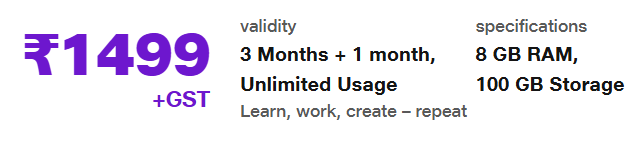
The 3-month subscription plan of JioPC is priced at Rs 1499 + GST for a limited period. This is a limited-period offer from Reliance Jio. Users can avail it and get 1 month additional validity with this pack, which means users can get a total validity of 3+1=4 months, equal to 120 days.
Additionally, users get access to 8GB RAM and 100GB storage for unlimited downloads. This plan is perfect for students, learners, and creators at an affordable price with a longer validity option.
JioPC 6-Month Plan: Rs 2499 + GST With Unlimited Usage

This JioPC plan for 6 months is also a limited-period offer introduced by Jio and priced at Rs 2499+ GST charges. The plan is absolutely perfect for all Jio customers, and the best part of the pack is, it comes with 6 months and an additional 2 months validity, equal to 240 days, along with 8GB RAM and 100GB storage with unlimited usage.
JioPC 12-Month Plan: Rs 1499 + GST With Unlimited Usage

This JioCloudPC plan for 12 months is also a limited-period offer from Jio and is valued at Rs 4599+GST charges. The plan is absolutely perfect for all Jio customers, and the best part of the pack is, it comes with 12 months and an additional 3 months validity, equal to 455 days (1.3 months). It also provides 8GB RAM and 100GB storage to its users with unlimited usage.
JioPC Benefits
Affordable Cloud-Based Computing:
JioPC offers a virtual desktop experience for just Rs 400 per month, making it a highly cost-effective solution instead of traditional PCs. Users can enjoy the performance and features equal to worth Rs 50,000 PC.
No External Requirement:
To start enjoying JioPC, customers only require a Jio Set-Top-box, a monitor or TV with HDMI support, a keyboard and mouse, or a preferred JioPC subscription plan.
Easy-to Set-Up & Use:
JioPC is designed in such a simplicity services that can turn any screen into a virtual desktop, providing users a window-like desktop experience. It’s easy to use & set up, ensuring a hassle-free experience, making it perfect for households, students, and small offices.
512GB Cloud Storage:
With 512GB of cloud storage, users can store their data and applications securely online. This eliminates the need for physical storage drives and ensures that files can be accessed from any device connected to the JioPC.
Built-In AI Tools:
JioPC also comes with a set of AI-powered tools that enhance productivity and user experience that supporting advanced workflows and making the platform suitable for modern digital tasks.
Network-Level Virus & Malware Protection:
Security is always a concern for PC users, but JioPC offers a built-in network-level virus and malware protection that eliminates the need for installing additional antivirus software.
Access to Premium Software:
The monthly JIoPC subscription plan includes complimentary access to premium applications such as Microsoft Office, Adobe Express, and Jio Workspace.
Free 1-Month Trial:
To make it easier to experience for the users, Reliance Jio is offering a 1-month free trial of JioPC to users.
How to Set Up JioPC?
To set up Jio, follow the steps below:
First, you have to switch on your smart TV and make sure that the set-top box is connected to the internet.

Then, simply navigate to the JioPC App and click on it to get started.

After clicking on the JioPC option, it will redirect you to the Welcome to JioPC page.

After that, click on the Skip option, and click on Get Started.
You will display another option with Explore more, Click on it to proceed further.

Then, it will show you a close option and display as Thank you for showing interest. We’ll be in touch with you soon.

Wait for at least 5 to 10 minutes, it will give a free trial worth Rs 599, and display as a Limited-period offer.

Then click on for free trial to proceed further to enjoy JioPC services.

After that, it will ask you to connect a wireless keyboard and mouse to your smart TV. And don’t worry, guys, if anyone has a wired mouse and keyboard, connect it to the Jio set-top box.

While you connect your keyboard and mouse, it will also show you whether you successfully connected or not.
Once you connect both the mouse and keyboard successfully, click on the proceed option as shown below.

Then you have to set up your JioPC account by entering your mobile number, email, name, and full name.

Once you create your JioPC account, click on Continue, and then you will be asked to set your password.

Once you set your password, it will send an OTP to your mobile number.

Then, enter the OTP and click on continue, and it will ask you to log in again as shown below.

After that, it will take up to 5 minutes or less time to set up based on your internet connection, as shown below.

Once you set up your JioPC doing all along click on launch now, and then at last you will enjoy JioPC.

Conclusion
That’s it, from the above guide, you all get the deep details on the JioPC services, their pricing, plans, availability, benefits, and more. In the rapidly growing digital era, it is a new initiative from Reliance Jio to provide its customers a step into the new era of AI, so guys don’t miss out on the opportunity, grab its free trial and comment below on how’s experience is.
