
TL;DR / Key Insights
- For most users in India, forcing NR Only breaks calling because 5G still depends on LTE.
- NR Only does not guarantee faster speeds. It helps only in strong 5G SA areas.
- If calls matter, NR/LTE is the correct setting, not NR Only.
- Samsung phones need NetMonster because One UI blocks the native shortcut.
- NR Only is a temporary tool, not a daily-use network mode.
Phones constantly switch between 4G and 5G. This back-and-forth causes unstable speeds, higher ping during gaming, and uneven downloads. Locking the phone to 5G looks like a simple fix.
That lock is called NR Only. NR stands for New Radio, the 5G air interface. When enabled, the phone refuses to connect to LTE, 3G, or 2G.
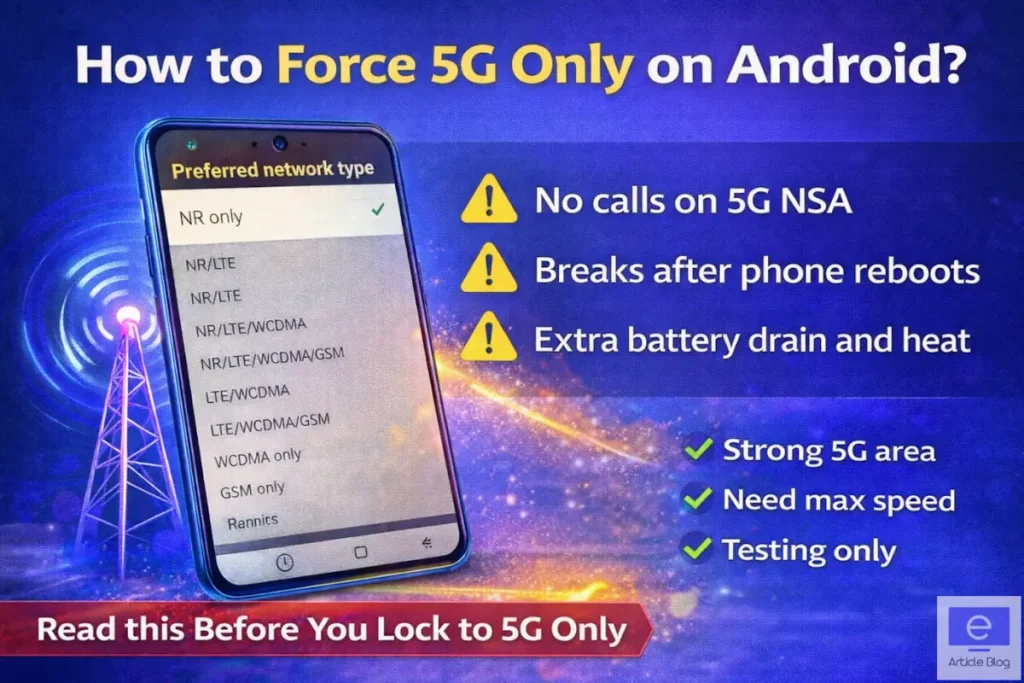
Here is the part most guides skip. In India, this setting often makes the phone unusable. Data may stop. Calls usually stop. Signal bars can still show, but nothing works.
This is not a bug. It is how current networks are built.
Why Phones Drop from 5G to 4G
Android prioritises stable connectivity and battery life over raw speed. When a 5G signal weakens, becomes congested, or demands more power, the modem hands off to LTE automatically. This behaviour is intentional.
Features like Smart 5G or Adaptive Connectivity exist to enforce this trade-off. They are designed to keep calls stable and battery drain under control, even if it means leaving 5G.
What can go wrong
- Total signal loss outside strong 5G coverage
- Calls and SMS stop working if VoNR is not supported
- Battery drain and heat as the modem pushes harder on weak 5G
- Settings reset after reboot, airplane mode, or updates
Green light checklist
- You are stationary in a strong 5G zone
- Your carrier runs 5G SA or you do not need calls
- You are testing speeds, gaming, or downloading large files
If these do not match, stop here.
Method 1: Hidden Menu (Pixel, Moto, Nothing, Sony)
Best suited for phones running near-stock Android.
Steps
- Open the Phone dialer
- Dial
*#*#4636#*#* - Tap Phone information
- Scroll to Set preferred network type
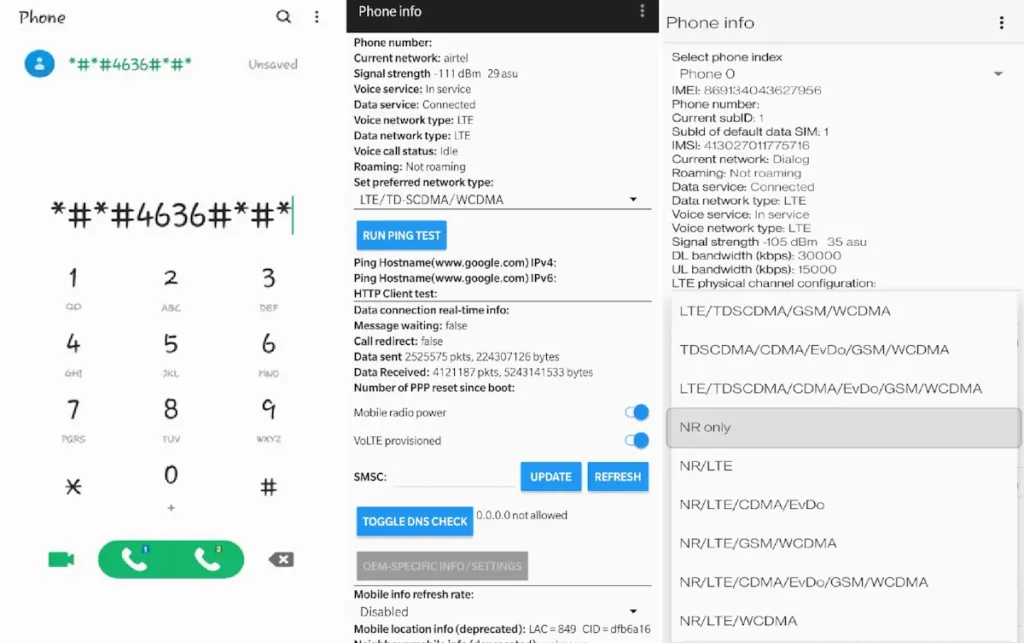
Which Option to Choose?
- NR Only Strict 5G lock. Useful for short tests. High chance of losing calls and signal.
- NR/LTE 5G is prioritised but LTE remains for voice. This is the recommended option.
Changes apply instantly. On many phones, the setting resets after reboot.
Method 2: On Samsung Smartphone with OneUI
Samsung blocks the dialer shortcut on most One UI versions.
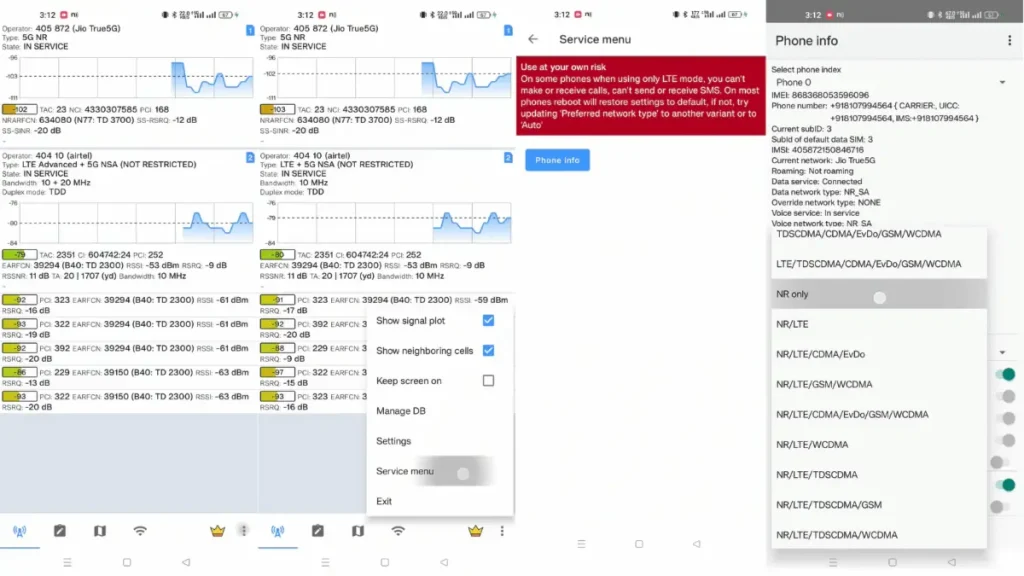
Solution A: NetMonster App
NetMonster opens the hidden Phone Info screen that Samsung hides but does not remove.
Steps:
- Install NetMonster from Play Store
- Open the app
- Tap the menu icon
- Select Phone Info
- Change Preferred network type
Why this works. Samsung blocks access, not the underlying Android menu.
Solution B: Service Mode
- Dial
*#2263# - Open Band Selection
- Choose NR 5G
- Enable all relevant bands
This controls bands, not a true NR-only lock. Use only if band behaviour is understood.
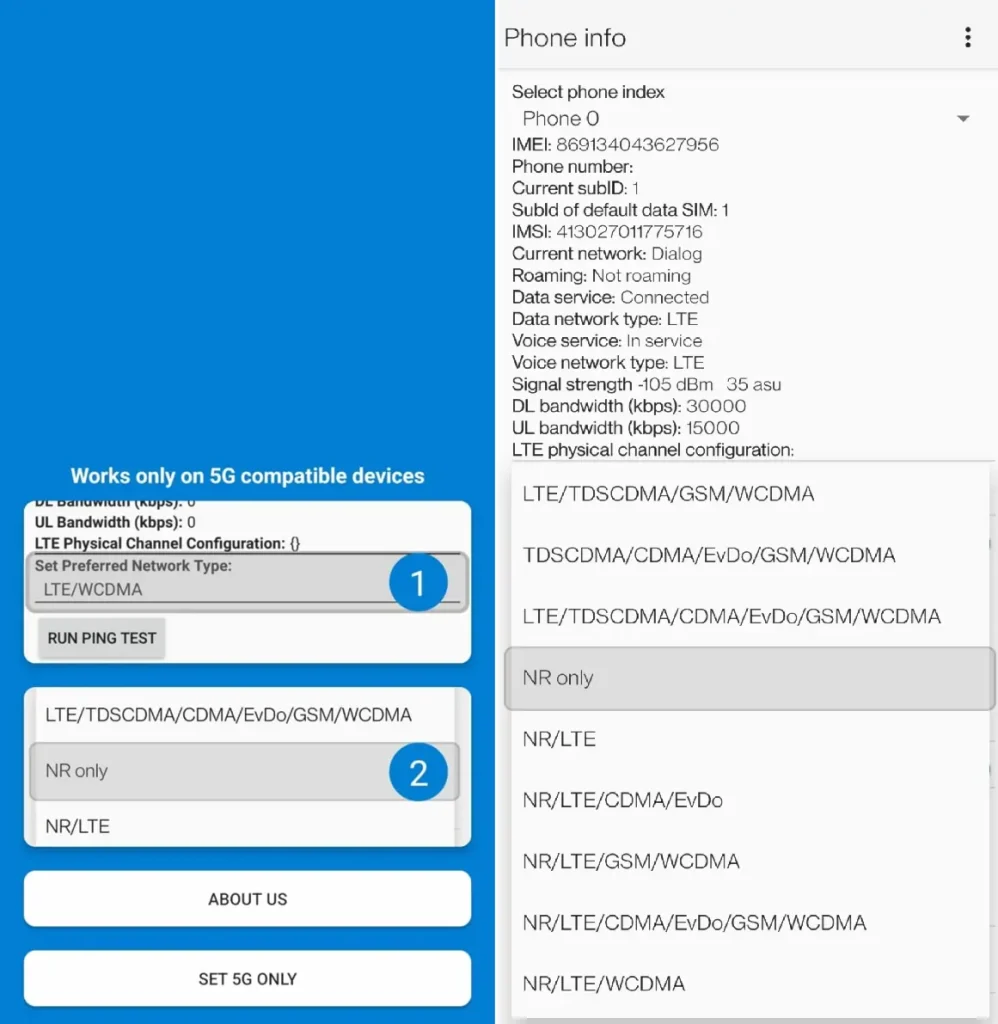
Method 3: Third-Party Apps (Xiaomi, POCO, OnePlus)
Some OEMs block both the dialer code and service menus.
Recommended Apps
- 5G Only Network Mode by Vidura Prasangana
- Netmonitor: 5G, Cell & WiFi by parizene
- 5G/4G Force LTE Only by Alpha Faster Apps
- 5G Switch – Force 5G Only by Sava KS
- 4G only Android 11+ by Haritha Hulangamuwa
Turn Off Smart 5G Setting
Disable this first.
- Settings
- Mobile Network
- More Settings
- Turn off Smart 5G
This prevents the OS from downgrading to 4G aggressively to save battery.
1. 5G Only Network Mode
2. Netmonitor: 5G, Cell & WiFi
3. 5G/4G Force LTE Only
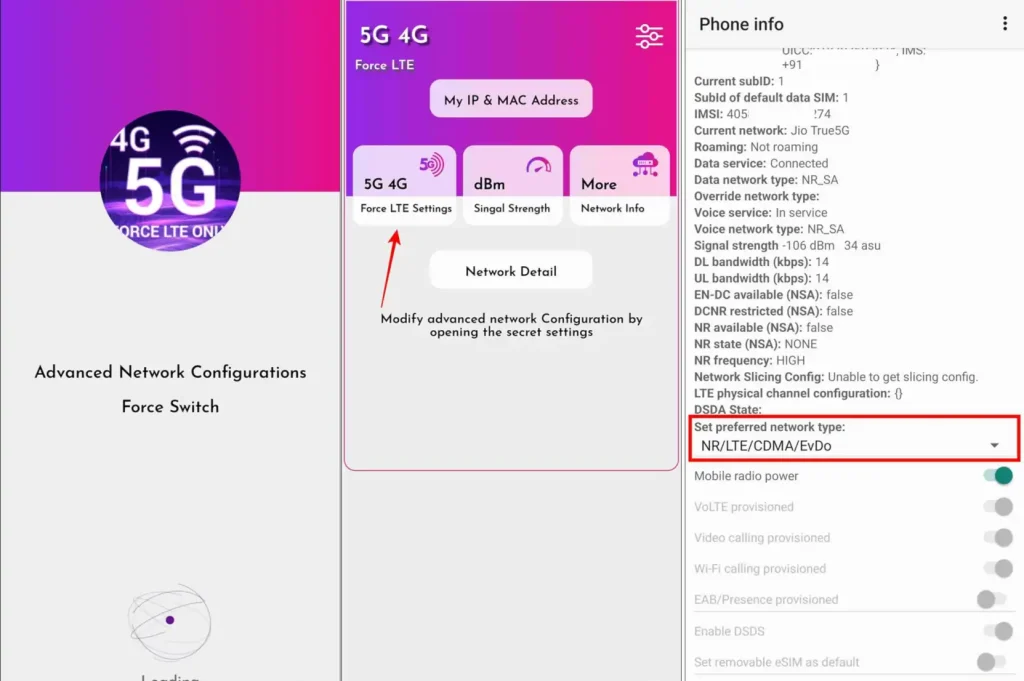
Why Calls Fail on 5G Only
Here is where things break.
- 5G NSA (Non-Standalone) still relies on LTE for control and voice.
- 5G SA (Standalone) is pure 5G. Voice works only with VoNR support.
When NR Only is forced on an NSA network, LTE disappears. LTE is not a fallback here. It is the control layer. Without it, calls cannot start.
Signal bars may show. That does not mean service exists.
In busy evening hours, carriers may also steer devices to LTE to manage 5G congestion, even when a 5G signal is present.
Compatibility Table –
| Network Type | Setting | Data | Calls | Result |
|---|---|---|---|---|
| 5G SA | NR Only | Works | Works if VoNR | Stable 5G |
| 5G NSA | NR Only | Often fails | Fails | No usable service |
| Any Network | NR/LTE | Works | Works via VoLTE | Best daily setup |
In India, Reliance Jio runs 5G SA. Airtel and Vodafone Idea still rely heavily on NSA for voice.
This behaviour aligns with how non-standalone 5G is defined in current 3GPP specifications, where LTE remains essential for control and voice.
Advanced Root Methods (Expert Only)
Root access allows deep control of the modem.
Tools
- Network Signal Guru on Qualcomm devices
Capabilities
- Locking SA or NSA modes
- Locking specific bands like n78 for speed or n28 for coverage
- Detailed RF diagnostics
Risks
- Warranty void
- Emergency calling may break
- Cellular stack can soft-brick easily
Not recommended unless RF behaviour is already familiar.
Troubleshooting and How to Revert Settings
No signal at all NR Only was forced on NSA coverage.
Data works but calls fail VoNR is not supported on the phone or network.
Fix Order
- Toggle Airplane mode
- Reopen the menu or app and select NR/LTE/GSM/WCDMA
- Reset network settings Settings → System → Reset → Wi-Fi, Mobile, Bluetooth
Test NR-only changes only in safe areas, as emergency calling can be affected if the phone loses network registration.
Frequently Asked Questions
1. Does forcing “5G Only” mode actually increase internet speed?
The short answer is: Not necessarily. While forcing “NR Only” (5G Only) can give you faster speeds in areas with a strong 5G Standalone (SA) signal, it often backfires on NSA (Non-Standalone) networks. In India, if you are on a network that relies on an LTE anchor, forcing 5G Only might cause your data to stop working entirely or cause the speed to “throttle” because the phone can’t talk to the 4G tower it needs for signaling.
2. Why does my phone show 5G signal bars but no internet in NR Only mode?
This usually happens because of the network architecture. Many providers use NSA (Non-Standalone) 5G, which uses 5G for data but still requires a 4G (LTE) connection to manage the “handshake” or control layer. When you force “NR Only,” you essentially cut off that 4G bridge. Your phone sees the 5G frequency, but it cannot “authenticate” the session, leaving you with full bars but zero throughput.
3. Is it safe to leave my phone on NR Only mode permanently?
It is generally not recommended. Keeping your phone locked to 5G Only leads to three main issues:
- Call Failures: If your area doesn’t support VoNR (Voice over New Radio), you won’t be able to make or receive calls.
- Battery Drain: Your modem will work overtime searching for a 5G signal in “dead zones” instead of seamlessly switching to 4G.
- Connectivity Gaps: You will lose all internet access the moment you enter a lift, basement, or area with patchy 5G coverage.
4. Can I use Jio 5G with the NR Only setting?
Yes, in most cases. Since Reliance Jio uses a 5G SA (Standalone) architecture, it is much more compatible with the “NR Only” setting than other networks. However, you should ensure your device supports VoNR; otherwise, your phone will stay connected to the internet, but your voice calls will fail or won’t connect at all.
5. Can forcing 5G Only damage my smartphone’s hardware?
No, it won’t physically “break” your phone or modem. However, it can cause thermal stress. In weak signal areas, forcing a 5G connection causes the modem to draw more power, leading to significant overheating and accelerated battery degradation over time. If your phone feels hot to the touch while on NR Only, it’s best to switch back to “5G Auto.”
Conclusion
NR Only is not a lifestyle setting. It is a tool for specific moments. Speed tests. Gaming sessions. Large downloads in strong coverage.
For daily use, NR/LTE is the correct balance. 5G stays active, calls work, and coverage gaps are handled without breaking the phone.
It looks less exciting. It works better.
