
TL;DR / Key Insights
- Telecom fraud in India often starts with identity misuse, stolen phones, or fake customer care numbers.
- Sanchar Saathi is a government-backed citizen portal that helps you detect unknown SIM cards, block lost phones, report scams, and verify telecom services.
- Sanchar Saathi works primarily through the official website, and there is also an official mobile app available for Android and iPhone, plus access through the UMANG app.
- Tools like TAFCOP, CEIR, and Chakshu work together to reduce telecom fraud at the network level, not just on your device.
- A quick check today can prevent identity theft, financial loss, and misuse of your mobile number.
Today, your mobile number is connected to banking, Aadhaar verification, OTP access, and personal communication. If someone misuses that number, the damage can spread quickly. Many people in India discover SIM cards issued in their name without consent, lose phones that later appear in grey markets, or receive scam calls pretending to be officials.
This is not just bad luck. It is part of a growing telecom fraud ecosystem where identity details, device IDs, and caller information are exploited.
To protect citizens, the Sanchar Saathi portal was launched by the Department of Telecommunications. It brings multiple telecom safety tools into one simple interface. Instead of running from office to office, you can check SIM ownership, block stolen devices, report fraud, and verify telecom providers in minutes.
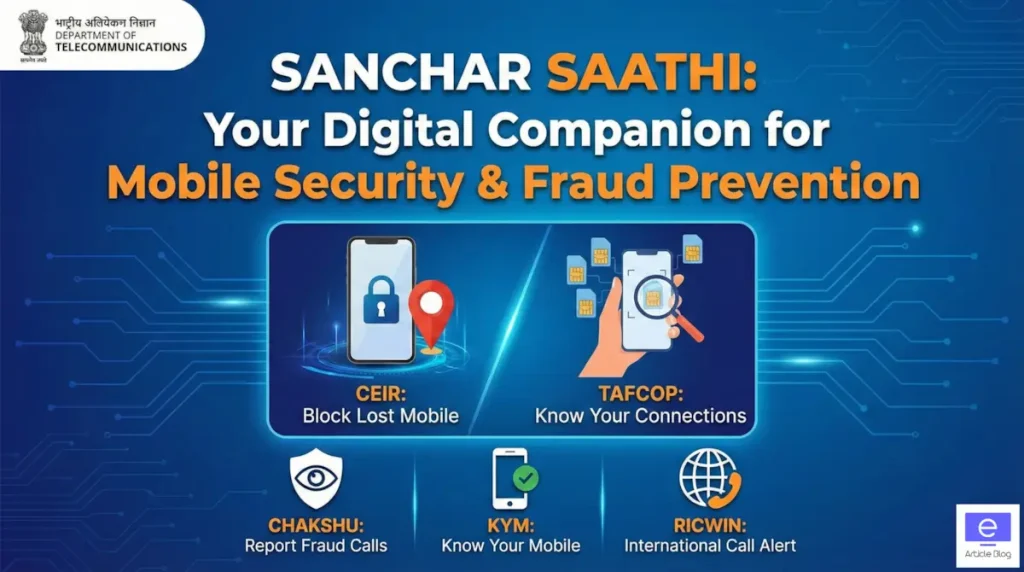
We will now walk through the seven pillars that make this system work:
- TAFCOP – SIM ownership check
- CEIR – lost phone blocking
- Chakshu – fraud reporting
- KYM – device verification
- RICWIN – spoofed call reporting
- KYI – ISP verification
- Trusted Directory – official contacts
But first, let’s see how to access it correctly.
Also check: PM Wani Wi-Fi Scheme
How to Access Sanchar Sathi Portal
Many people think they must download an app. That is not required.
Method 1: Direct Web Access
Open the official portal:
sancharsaathi.gov.in
It works smoothly on basic smartphones and computers. You get full features without installing anything.
Here’s what most people miss. The portal is designed for mobile browsing, so performance is the same as an app.
Method 2: Download Sanchar Saathi App
While the Sanchar Saathi features can be used on the web, there is also an official Sanchar Saathi mobile app developed by DoT, available on both Google Play Store (Android) and the Apple App Store.
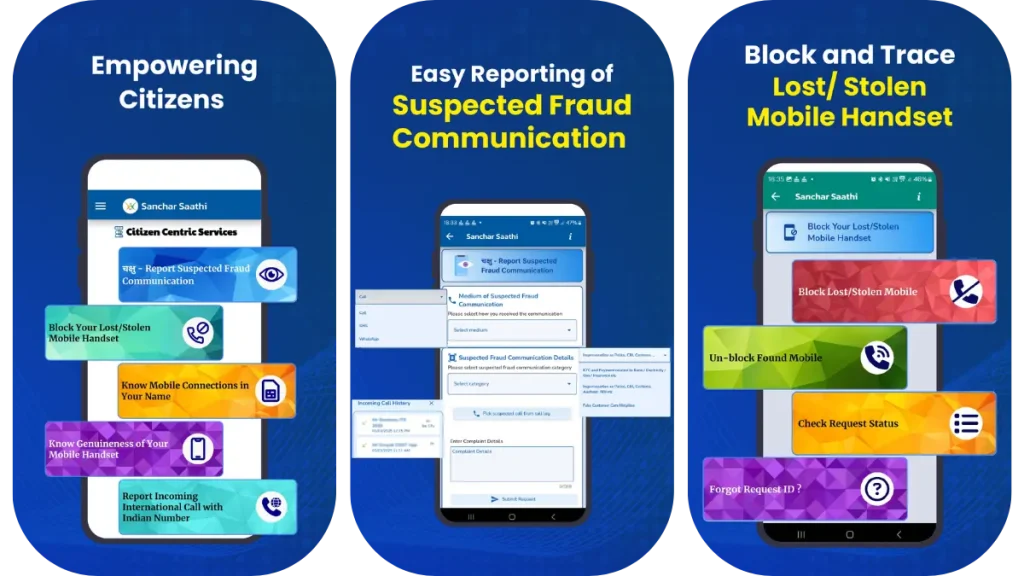
The app makes it easy to use many services on your phone without opening a browser.
Why Use the Sanchar Saathi App
The mobile app lets you:
- Report suspected fraud calls and SMS directly from your call/SMS logs.
- Register your phone number for services like checking SIM connections.
- Scan IMEI barcode using the phone camera to check if a handset is genuine.
- Upload photos and files when reporting a lost or stolen handset.
All this is done securely and is free to use.
Step-by-Step: How to Download the Sanchar Saathi App
On Android
- Open the Google Play Store on your phone.
- In the search bar, type Sanchar Saathi.
- Look for the app published by Department of Telecommunications, Govt of India.
- Tap Install and wait for it to download.
- Once installed, tap Open to launch the app.
The app icon is usually government-style and should show the official logo.
On iPhone (iOS)
- Open the App Store.
- Search for Sanchar Saathi.
- Verify that the developer shows Department of Telecommunications / Government of India.
- Tap Get and authenticate (Face ID or Apple ID).
- Open the app once installed.
First-Time Setup and Registration
When you open the app for the first time:
- It will show an introductory screen explaining the main services.
- You may see a registration prompt asking you to send an SMS to 14522 (a DoT number) to register your active mobile number.
- The app may automatically send the SMS in the background (this helps register your number and show it in lists).
- Once registered, you will see your mobile numbers listed so you can choose them when using services inside the app.
This makes it easier to report fraud, check SIM connections (TAFCOP), or verify IMEI without typing numbers again.
Why Telecom Fraud Happens in India
Telecom fraud is not random. It usually follows patterns:
- SIM cards issued using stolen identity details
- IMEI cloning to resell stolen phones
- Caller ID spoofing to hide scam origins
- Fake customer care numbers targeting bank users
How SIM Misuse Happens
When identity documents are misused, fraudsters activate SIM cards for scams. To reduce this, connection limits were introduced and verification tools like TAFCOP were created.
How IMEI Blocking Works
Every phone has a unique IMEI number. When CEIR blocks an IMEI, telecom operators share this blacklist. The device cannot connect to Indian networks, making resale difficult.
Why Citizen Reporting Matters
Fraud reports help telecom enforcement teams detect patterns and disable illegal operations. Each report strengthens the system.
Now let’s move to practical tools.
Feature 1: Reporting Fraud, Spam & Suspicious Links (Chakshu)

This module is your first defence against telecom scams. It lets citizens report suspicious communication so telecom systems can detect and block repeat offenders.
Purpose
- Report fraudulent calls or messages
- Report spam or unsolicited commercial communication (UCC)
- Report suspicious or malicious web links
Important rule
Reports must be filed within 30 days for action.
How it works
- Select category: Fraud, Spam, or Web Link
- Click Proceed
- Enter details and upload proof
- Submit verification
Here’s why this matters. Each complaint feeds into telecom enforcement systems that identify scam patterns across networks.
In short: Chakshu helps stop scam activity early, before it spreads to more users.
Feature 2: Block or Recover a Lost / Stolen Mobile (CEIR)

This feature manages what happens after a phone is lost or stolen. It prevents misuse and allows recovery if the device is found.
Purpose
Disable stolen devices at the telecom network level and restore service when recovered.
Available services
- Block handset → disables device across Indian networks
- Unblock handset → restores service after recovery
- Check request status → track progress
- Forgot request ID → retrieve tracking details
Workflow overview
| Step | Why it exists |
|---|---|
| Submit IMEI + FIR | Ownership verification |
| OTP validation | Identity confirmation |
| Network block | Prevents reuse or resale |
When blocked, the IMEI is shared across telecom operators, stopping the phone from connecting.
In short: CEIR turns a stolen phone into an unusable device, reducing black-market resale.
Feature 3: Check Mobile Connections in Your Name (TAFCOP)

TAFCOP lets you confirm how many SIM cards are linked to your identity. This protects against identity misuse.
Purpose
Verify authorised mobile connections issued in your name.
Login process
- Enter 10-digit mobile number
- Complete Captcha
- Verify via OTP
After login, you can:
- View all linked numbers
- Report unknown connections
- remove unused SIMs
Here’s the critical part. Many people discover SIM misuse only after fraud. TAFCOP allows early detection.
In short: TAFCOP acts like a telecom identity audit.
Feature 4: Verify Handset Genuineness (KYM)

KYM helps users confirm whether a mobile phone is genuine before purchase or use.
Purpose
Check IMEI authenticity and manufacturer registration.
Portal method
- Enter Captcha
- Verify mobile via OTP
- Submit 15-digit IMEI
SMS alternative
Send:
KYM <15-digit IMEI> to 14422
Possible results
| Result | Meaning |
|---|---|
| Genuine | Safe device |
| Blacklisted | Stolen device |
| Duplicate | Cloned IMEI |
This verification prevents buying illegal or compromised devices.
In short: KYM protects you from unknowingly purchasing stolen phones.
Feature 5: Report International Calls Showing Indian Numbers (RICWIN)

RICWIN addresses caller ID spoofing, where international scammers display +91 numbers.
Purpose
Report suspicious international calls pretending to be local.
Required reporting fields
- Receiving mobile number
- Displayed Indian number
- Date and time (within 30 days)
- Suspected country of origin
- Remarks description
Submission requires Captcha + OTP verification.
Alternative reporting
Call:
- 1963
- 1800-110-420
Reports help telecom filters block illegal call gateways.
In short: RICWIN reduces spoofed scam calls across networks.
Feature 6: Find Authorised Wireline Internet Providers (KYI)

KYI allows users to confirm whether broadband providers are officially licensed.
Purpose
Locate authorised internet service providers in your area.
Search options
- By PIN code
- By address
- By ISP name
This protects users from unregistered operators.
In short: KYI ensures your internet provider is legally recognised.
Feature 7: Trusted Contact Directory

This directory prevents fake customer care scams by listing verified institutional contacts.
Purpose
Provide official contact details for banks and essential organisations.
Search categories
- By organisation name
- By website
- By email
- By contact number
Always verify helplines here before sharing personal information.
In short: Trusted contacts help you avoid impersonation scams.
How These Features Work Together
Detection → reporting → blocking → verification forms a continuous protection loop:
- TAFCOP detects identity misuse
- Chakshu reports scam communication
- CEIR blocks stolen devices
- KYM verifies handset legitimacy
- RICWIN flags spoofed calls
Together, they strengthen telecom safety for everyone.
Real-World Impact
Telecom enforcement teams regularly disable large batches of unauthorized SIM registrations and cloned devices. Citizen participation through Sanchar Saathi directly contributes to these actions. TAFCOP detection, CEIR blocking, and Chakshu reporting work as a continuous protection loop.
This is not just personal safety. It is part of a national telecom security framework.
Frequently Asked Questions
Is the Sanchar Saathi portal free to use?
Yes, Sanchar Saathi is 100% free. It is an official citizen-centric initiative by the Department of Telecommunications (DoT) to improve mobile security and prevent fraud. There are no hidden charges for blocking phones or checking SIM connections.
Can I track my lost phone’s live location using CEIR?
No, the CEIR portal does not allow citizens to track live locations. Only law enforcement authorities and police can track a lost device. As a user, your role is to use CEIR to block the IMEI number, rendering the device useless for the thief across all Indian networks.
What should I do if I accidentally block my own phone?
You can easily unblock it via the portal. If you find your device or blocked it by mistake, visit the CEIR section and select the “Unblock Found Mobile” option. You will need your Request ID and mobile number to verify your identity, and network services will be restored (usually within 24 hours).
Is my personal data safe on the TAFCOP portal?
Yes, your data is secure. TAFCOP is a government-managed platform under the Department of Telecommunications. It uses strict security protocols to ensure your Aadhaar and mobile number data are only used for verification and fraud prevention purposes.
Can someone activate a SIM in my name without my knowledge?
Yes, identity theft (fake KYC) is a real risk. Fraudsters often use stolen ID proofs to activate illegal SIM cards. This is exactly why you should use the TAFCOP module to regularly check the list of active numbers linked to your ID and report any that you do not recognize.
Does blocking a phone on CEIR work outside India?
No, the CEIR block is limited to Indian telecom networks. If your phone is taken abroad, it may still function with an international SIM card. However, blocking it ensures it cannot be used with any Indian SIM (Jio, Airtel, Vi, BSNL), making it harder to sell locally.
Can someone falsely report or block my number?
It is highly unlikely. The Sanchar Saathi portal requires OTP verification and links to your specific identity documents (Aadhaar/Purchase Invoice) before accepting a block request. This strict verification process prevents malicious users from blocking phones they do not own.
Does blocking my phone via CEIR delete my data?
No, CEIR blocking does not wipe your phone’s data. It only blacklists the device’s IMEI number to prevent network connectivity. Your photos, contacts, and apps remain on the device, but the thief cannot make calls, send SMS, or use mobile data.
Conclusion
Sanchar Saathi is more than a lost-phone tool. It is a complete digital hygiene system that protects identity-linked SIM cards, blocks stolen devices, enables fraud reporting, and verifies telecom services.
Here’s the smart move.
Open the portal today, use TAFCOP, and confirm that every mobile number linked to your identity belongs to you.
A simple check today can prevent serious trouble tomorrow. Stay alert, stay protected.
